HOW CAN YOU LEARN AND USE AI PLATFORMS EFFECTIVELY?

How Can You Learn and Use AI Platforms Effectively?

Discover how to learn and use AI platforms like TensorFlow, Hugging Face, UiPath, and DALL·E through interactive quizzes, tutorials, and project-based learning. Whether you’re a beginner or an expert, find the right tools to build your skills and explore real-world applications of artificial intelligence.

Artificial Intelligence is no longer just a buzzword—it’s a powerful force transforming industries, workflows, and creative pursuits. Whether you’re a student curious about machine learning, a professional aiming to automate business processes, or a creative exploring generative tools, AI platforms offer accessible and diverse ways to bring your ideas to life. But with so many tools available—ranging from no-code platforms to advanced deep learning frameworks—knowing where to start can feel overwhelming.

This guide will walk you through what it means to study AI platforms, introduce you to some of the most widely used tools in machine learning, natural language processing, and automation, and show you how to build your skills through projects, tutorials, and real-world applications. Whether you’re a beginner or a seasoned tech enthusiast, you’ll find practical strategies to navigate the AI landscape with confidence and clarity.

Interactive AI Learning Experience: Explore AI Platforms Your Way

Start With a Quick Poll

What’s your current experience level with AI?
(Select one)

  • Beginner: Just curious or starting out
  • Intermediate: I’ve tried a few tools or courses
  • Advanced: I build or deploy AI models regularly

Your selection will help tailor the rest of the experience to your level.

Interactive Quiz: What Kind of AI Explorer Are You?

Take this 5-question quiz to discover which AI tools and platforms are right for you.

1. What excites you most about AI?
A) Creating smart apps or chatbots
B) Automating tasks or business workflows
C) Designing visual content like images or videos
D) Understanding data and trends
E) Making learning fun with visual tools

2. Preferred way of working?
A) Writing code and tweaking models
B) Drag-and-drop interfaces or no-code solutions
C) Playing with text prompts or creative tools
D) Analyzing numbers, patterns, and reports
E) Interactive, beginner-friendly tools

3. Which sounds like a dream project?
A) Training a language model
B) Automating invoice processing
C) Making a comic book using AI art
D) Predicting stock prices
E) Building an animal classifier using a webcam

4. How comfortable are you with Python?
A) Fluent
B) Somewhat familiar
C) Never tried it
D) Prefer not to code
E) I like learning visually

5. You prefer learning by…
A) Deep-diving into docs and code
B) Tutorials and structured courses
C) Quick experiments and creativity
D) Real-world use cases and data
E) Visual, hands-on tools

Get My AI Explorer Profile (Button)

(For educational use only — this button doesn’t do anything on this page.)

Results Page: Your AI Explorer Type

Depending on your answers, here are examples of profiles you might match with:

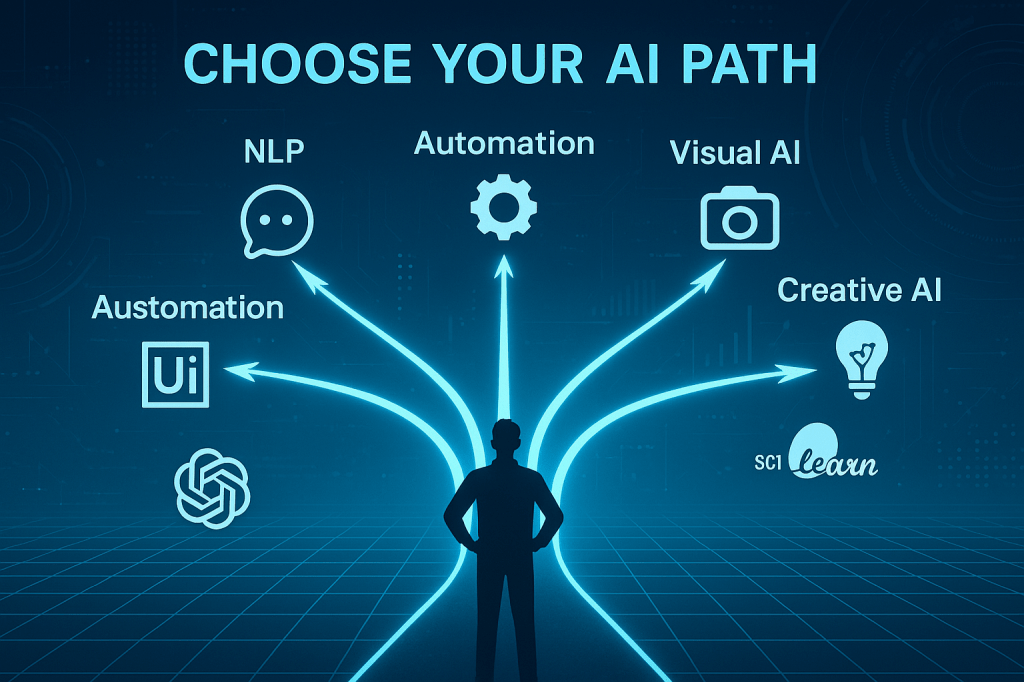
  • The NLP Coder: You’re drawn to tools like Hugging Face, OpenAI API, and TensorFlow for working with language and text.
  • The Business Optimizer: You prefer platforms like UiPath, H2O.ai, and DataRobot that streamline workflows and unlock insights.
  • The Creative Visionary: You’re excited by tools like DALL·E, Midjourney, and Synthesia that help you create visual and multimedia content.
  • The Visual Learner: You enjoy using intuitive, beginner-friendly platforms like Teachable Machine and IBM Watson Studio.
  • The Data Tinkerer: You like working with numbers and analysis using tools like scikit-learn and participating in Kaggle competitions.

Where to Begin With AI

Here are some quick ideas to get started:

  • Want to build a chatbot? Try OpenAI’s API or Hugging Face with Python.
  • Interested in automating repetitive tasks? Explore UiPath or Azure ML Studio with drag-and-drop workflows.
  • Curious about computer vision? Use Teachable Machine or TensorFlow to create a custom image classifier.
  • Working with text data? Try MonkeyLearn or scikit-learn for sentiment analysis and text classification.
  • Love creative content? Generate images or videos with tools like DALL·E or Sora.

Join the Conversation

Poll: Which AI platform are you most excited to explore this month?
(Real-time results after voting)

  • Hugging Face
  • UiPath
  • Teachable Machine
  • DALL·E / Sora
  • DataRobot

Comment Wall: Share your favorite AI tool or a project idea you’re thinking of starting.
Final Call to Action

Ready to Learn More?
Visit our Resource Hub to explore beginner-friendly tutorials, coding guides, and real-world project ideas designed to help you grow your AI skills.

Explore More at Rise & Inspire archive. |   Tech Insights

Categories: Astrology & Numerology | Daily Prompts | Law | Motivational Blogs | Motivational Quotes | Others | Personal Development | Tech Insights | Wake-Up Calls

🌐 Home | Blog | About Us | Contact| Resources

📱 Follow us: @RiseNinspireHub

© 2025 Rise&Inspire. All Rights Reserved.

Word Count:775
WHAT ARE THE BEST NLP TOOLS TO EMPOWER YOUR PROJECTS?


Discover the top NLP tools—libraries, APIs, and platforms—that help you build intelligent applications, analyse text, and boost productivity in your personal and professional projects.

CORE MESSAGE OF THE BLOG POST:


This blog post aims to empower readers—especially developers, digital creators, and curious learners—with the knowledge of top NLP tools that can enhance personal and professional projects. It highlights how Natural Language Processing (NLP) is transforming human-computer interaction and presents a curated overview of the best libraries, APIs, chatbot platforms, annotation tools, and experimental frameworks to help readers:

  • Build intelligent applications
  • Automate tasks
  • Analyse and generate human language
  • Enhance content creation and productivity
    The underlying message is that NLP is accessible to everyone, not just tech giants, and that with the right tools, anyone can build smart, impactful language-based solutions.

Natural Language Processing (NLP) is transforming the way humans and machines interact. From smart assistants and chatbots to sentiment analysis and real-time translation, NLP helps computers understand, interpret, and generate human language.
For bloggers, educators, developers, and digital creators, understanding NLP tools opens doors to automation, content enhancement, and even building intelligent applications.
In this post, let’s explore the most effective NLP tools you can use to elevate your ideas and projects.

POPULAR NLP LIBRARIES
If you enjoy coding and want full control over your NLP applications, these libraries are powerful and widely used:
spaCy is designed for performance and production use. It’s one of the most efficient NLP libraries, supporting tagging, parsing, named entity recognition (NER), and more.
NLTK (Natural Language Toolkit) is ideal for education and prototyping. It offers everything from tokenisation to linguistic datasets and is a great starting point for beginners.
Transformers (by Hugging Face) gives access to powerful pre-trained models like BERT, GPT, RoBERTa, and more. Hugging Face has become the go-to platform for state-of-the-art NLP.
Gensim specialises in topic modelling and vector space modelling. It’s ideal for semantic analysis and identifying trends or similarities in text.
Stanford NLP / Stanza is developed by Stanford University and includes tools for syntactic analysis, dependency parsing, and part-of-speech tagging.
Apache OpenNLP is a Java-based machine learning toolkit that supports sentence detection, tokenisation, POS tagging, and more.

CLOUD-BASED NLP APIs
If you want to skip the technical setup and jump straight into building applications, cloud-based APIs offer plug-and-play NLP features:
Google Cloud Natural Language API performs entity analysis, sentiment analysis, and syntax parsing with support for multiple languages.
Microsoft Azure Text Analytics detects language, key phrases, and sentiment with robust enterprise support.
Amazon Comprehend extracts insights from documents including sentiment, entities, and key phrases. It can also detect personally identifiable information (PII).
IBM Watson NLP offers advanced tone analysis, translation, conversation services, and text classification.
Hugging Face Inference API makes it easy to use thousands of pre-trained models with a simple API call.

NLP TOOLS FOR CHATBOTS AND ASSISTANTS
Building smart conversations? These platforms make it easier to create AI-driven chatbots and assistants:
Rasa is open-source and developer-focused. It lets you build customizable chatbots with full control over logic and integrations.
Dialogflow (by Google) is a user-friendly platform that integrates well with Google Assistant and supports both voice and text interfaces.
Microsoft Bot Framework offers scalable bot development with easy integration into Microsoft Teams and Azure AI.
Wit.ai (by Meta) extracts intents and entities from voice or text, perfect for commands and digital assistants.
Botpress is an open-source chatbot builder with modular NLP components and strong community support.

TEXT PROCESSING AND ANNOTATION TOOLS
For supervised learning or content tagging, data labelling tools are crucial. These help you train and improve NLP models:
Prodigy is a commercial tool designed for efficient data labelling with active learning support.
Label Studio is an open-source and multi-format annotation platform suitable for text, images, and audio.
Doccano is easy to use and well-suited for classification, sequence labelling, and named entity recognition.
LightTag offers a team-friendly interface and supports NLP model suggestions during annotation.

VISUALIZATION AND MODEL INTERPRETATION TOOLS
Understanding how models behave is key to improving them. These tools help visualise or explain NLP model outcomes:
Displacy (from spaCy) visualises syntactic structures and named entities directly in the browser.
LIME and SHAP are explainable AI tools that break down how input features impact NLP model predictions.
TensorBoard visualises training progress, embeddings, and more for TensorFlow-based NLP projects.

EXPERIMENTAL AND CUTTING-EDGE TOOLS
For those exploring advanced NLP applications, these tools are at the forefront of innovation:
Haystack is an NLP framework for building end-to-end search and question answering systems.
LangChain powers applications using large language models (LLMs) with tools, memory, and chaining capabilities.
PromptLayer and LlamaIndex help track prompts and optimise prompt engineering for applications using language models.

GETTING STARTED: WHICH TOOL SHOULD YOU CHOOSE?
If you’re new to NLP, start with NLTK or spaCy to understand the basics.
For production-level apps, try spaCy, Transformers, or cloud APIs like Google Cloud NLP.
For chatbot development, use Rasa or Dialogflow.
For content creators, tools like Hugging Face, Gensim, or Watson NLP can automate and enrich your writing processes.

A FINAL NOTE
Natural Language Processing is no longer reserved for tech giants. With so many powerful, accessible tools, anyone with curiosity and purpose can build, analyse, and understand language-based applications. Whether you’re automating blog summaries, analysing reader sentiment, or building a chatbot for your brand, there’s an NLP tool that fits your journey.
At Rise&Inspire, our mission is to help you strive to elevate in life—and technology is one of the ladders to climb higher. Explore these tools, experiment boldly, and let your ideas speak smarter and louder.

Explore additional inspiration from the blog’s archive. |   Tech Insights 

Categories: Astrology & Numerology | Daily Prompts | Law | Motivational Blogs | Motivational Quotes | Others | Personal Development | Tech Insights | Wake-Up Calls

🌐 Home | Blog | About Us | Contact| Resources

📱 Follow us: @RiseNinspireHub

© 2025 Rise&Inspire. All Rights Reserved.

Word Count:982

Can You Train an AI Model for Text Analysis Without Coding Skills?

Want to analyze text with AI but don’t know how to code? This guide introduces you to the best no-code tools to build custom machine-learning models for sentiment analysis, classification, and more — perfect for beginners.

You, the Builder: 

How to Train an AI Model Without Writing Code (Text Edition)

You’re curious — not just about using AI, but about how it works under the hood. You’re not necessarily a coder (yet), but you like to tinker. You want to go deeper. You want to build something, even if it’s just simple, just once, just to understand.

That’s where your journey starts: building a machine-learning model without writing a single line of code.

Why Bother with No-Code AI?

Because understanding the engine helps you drive the car better.

You don’t need to be an engineer to use AI powerfully. But if you know what happens behind the scenes — even just a little — you become a better user, a better decision-maker, a better builder.

Especially when it comes to text: reviews, emails, chats, comments, and support tickets. You’re surrounded by it. What if you could analyze it automatically?

Let’s walk through how.

Your No-Code AI Toolbox: Analyzing Text with Just Clicks

Here are the best platforms to help you build custom AI models for text classification, sentiment analysis, and more — without code.

1. MonkeyLearn — The Visual Playground for Text

Perfect for you if you want to build something fast and intuitive.

  • Go to monkeylearn.com
  • Choose a template (like sentiment analysis) or start from scratch
  • Upload or paste your text examples
  • Tag a few examples (e.g., “positive”, “negative”, “neutral”)
  • Click to train your model
  • Voilà — you can now classify new text instantly

MonkeyLearn even gives you charts and dashboards to visualize the results.

Use it for:
Customer feedback, reviews, social media comments, or support ticket triage.

2. Akkio — AI for Business Brains

You’ve got a spreadsheet of data: maybe support logs or survey responses. You want to predict something based on it — like sentiment or urgency.

  • Visit akkio.com
  • Upload your CSV or connect to Google Sheets
  • Choose what you want to predict (e.g., the “Sentiment” column)
  • Akkio builds your model in seconds
  • Get instant predictions, deploy via API, or automate through Zapier

Use it for:
Quick insights, customer churn prediction, lead scoring, and marketing analysis — all from text.

3. Google AutoML (Vertex AI) — The Heavy Lifter

Maybe you want to go deeper — train something serious, like a customer intent classifier, and deploy it to an app.

  • Head to Google Vertex AI
  • Upload labeled data (CSV format works great)
  • Choose Natural Language Processing (NLP)
  • Train your model with a few clicks
  • Google handles the rest — infrastructure, evaluation, deployment

Use it for:
Enterprise-grade classification, entity extraction, or sentiment tasks on large volumes of text.

4. Teachable Machine & Lobe — More Visual Than Textual, But Worth Knowing

These tools are better suited for image/audio models, but if you’re ever curious to teach an AI to recognize sounds or gestures, check out Teachable Machine or Lobe.

They’re no code. Super visual. Totally fun.

5. Bonus: Automate with ChatGPT + Zapier

Want to summarize emails automatically? Or extract data from form responses?

  • Use Zapier to trigger workflows (like new emails)
  • Add a step that sends the text to ChatGPT or OpenAI
  • Get a custom response (summary, category, extracted info)
  • Route it into Google Sheets, Slack, or Notion

No model training here — just clever automation with AI.

What If You Actually Want to Build Something Right Now?

Try this:

  1. Gather 10–50 text samples.
  2. Decide what you want to label them as (e.g., topic, mood, urgency).
  3. Go to MonkeyLearn or Akkio.
  4. Train a model with just clicks.
  5. Watch the AI make predictions — and get a feel for how it learns.

You don’t need to be a coder to build something powerful. You just need curiosity and a willingness to experiment.

Welcome to the world of AI. You’re not just a user anymore — you’re a builder.

Explore additional inspiration from the blog’s archive. | Tech Insights

Categories: Astrology & Numerology | Daily Prompts | Law | Motivational Blogs | Motivational Quotes | Others | Personal Development | Tech Insights | Wake-Up Calls

🌐 Home | Blog | About Us | Contact| Resources

📱 Follow us: @RiseNinspireHub

© 2025 Rise&Inspire. All Rights Reserved.

Word Count:716